Two-Factor Authentication by Text Message
Last updated: September 11, 2026
Gatherhoods is a neighborhood dinner-hosting platform operated by Gatherhoods LLC. This page describes our optional SMS-based two-factor authentication (2FA) program — how it works, how you opt in, and how to stop receiving these messages.
What This Program Is
If you choose to add text-message verification as a sign-in method on your Gatherhoods account, we’ll text you a one-time verification code each time you sign in using that method. This is a security feature, not a marketing or activity-notification program — it is entirely separate from any other messages Gatherhoods might send.
How To Opt In
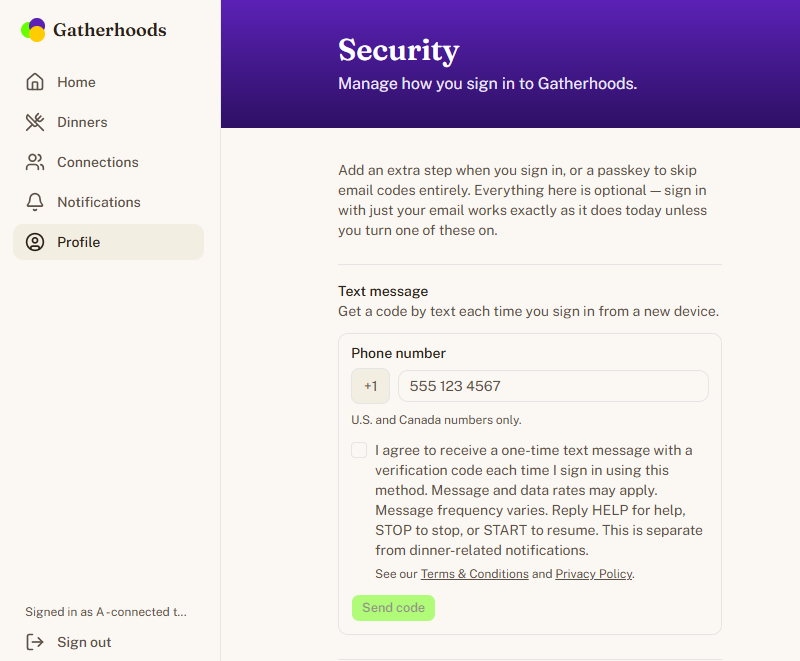
Text-message verification is optional and is set up from your account’s Security settings page, after you’ve already created a Gatherhoods account with your email address. To turn it on, you enter your phone number and check a box that reads:
“I agree to receive a one-time text message with a verification code each time I sign in using this method. Message and data rates may apply. Message frequency varies. Reply HELP for help, STOP to stop, or START to resume. This is separate from dinner-related notifications.”
Directly below the checkbox, a separate line reads “See our Terms & Conditions and Privacy Policy,” linking to both.
Checking the box and submitting the form only sends a one-time verification text to the number you entered — nothing is saved or enabled yet. The phone number only becomes an active sign-in method once you receive that real text message and enter the correct code back into the app. You cannot enable this feature without checking that box. Nothing about using Gatherhoods — creating an account, browsing dinners, requesting to join one, or hosting — requires turning this on; it is entirely optional and only affects how you sign in if you choose to use it.
Below is a screenshot of this exact screen in the live product (Gatherhoods Security settings, signed in):
Sample Message
“Gatherhoods: Your verification code is 123456. This code expires shortly. Reply STOP to opt out, HELP for help.”
Message Frequency
This is a transactional program, not a recurring one — you receive exactly one text message per sign-in attempt using this method, only when you yourself initiate a sign-in. If you don’t use text-message verification to sign in, you receive no messages under this program at all. Message and data rates may apply.
How To Opt Out
Reply STOP to any Gatherhoods verification text at any time, or remove text-message verification from your Security settings while signed in. You’ll get one confirmation message, and we will not send any further verification texts to that number. Reply START to resume.
How To Get Help
Reply HELP to any Gatherhoods verification text, or contact us at support@gatherhoods.com with any questions.
Your Information
We do not sell or share your phone number, or your consent to receive these messages, with third parties for marketing purposes or with lead generators. Your phone number is used solely to deliver the verification code you requested. See our Privacy Policy for full details, and our Terms & Conditions for the terms governing your use of Gatherhoods.
Carriers are not liable for delayed or undelivered messages.